Online & in-store shopping
Map product discovery, online checkout and intended POS operations. POS is coming soon; a shared live inventory connection is not assumed.

Connect shopping and fulfilment, from online and in-store ordering to local delivery and Canada-wide shipping. Jaranova helps shape the storefront, merchant workflows and delivery plan around your existing systems, with integrations verified before rollout.

Find products online or in store.
Choose an eligible fulfilment method.
Validate stock, address and order status.
Pick, pack and prepare the handoff.
Use the agreed carrier or local fleet.
Review tracking and delivery evidence.
A proposed operating journey. WooCommerce, carrier and POS connections are validated per merchant before activation.
The following workstreams inform your proposal. The agreed deliverable list defines what is included; they are not an automatic package bundle.
Map product discovery, online checkout and intended POS operations. POS is coming soon; a shared live inventory connection is not assumed.
Agree stock ownership, order validation, picking, packaging and pickup readiness. Cover changes, cancellations and failed handoffs.
Choose local/instant delivery, scheduled options where supported, or carrier shipping through your merchant-owned ClickShip/Freightcom account.
Scope customer visibility, delivery evidence and exception handling. Provider tracking and Delivery OS capabilities are verified for the chosen workflow.
Workflow illustration. Application connections and automation are verified separately before activation.
Connect store orders with the right delivery method, shipping account and operating tools.
Scope local delivery around pickup readiness, service areas, capacity and customer expectations. Instant or scheduled services depend on the supported provider and location.
Coverage & service level confirmed per storeUse merchant-owned ClickShip/Freightcom accounts for eligible carrier services. ClickShip documents WooCommerce order/product sync, checkout rates, label creation and tracking.
Provider capability documented · Store setup requiredThe public platform presents merchant workspaces, dispatch, driver assignments, tracking and proof of delivery. Verify the current build and merchant connection before a live rollout.
Explore Delivery OS ↗| Method | Ideal use case | Merchant responsibilities | Availability |
|---|---|---|---|
| Local / instant delivery | Nearby retail orders needing a prompt handoff. | Prepare the order; confirm address, coverage, driver/provider capacity and any handling requirements. | Quote and service-area review; no universal delivery time promised. |
| Scheduled delivery | Agreed delivery windows or planned store routes. | Set cutoffs, pickup readiness, capacity and customer availability. | Where supported by the selected provider and current operating build. |
| Canada-wide shipping | Carrier-eligible parcels beyond the local delivery area. | Own and fund the shipping account; supply accurate weights/dimensions, package goods, book handoff and handle exceptions. | Carrier coverage, service terms and product eligibility apply. |
Merchants fund ClickShip/Freightcom labels and carrier charges through their own accounts. Applicable Jaranova integration, maintenance and support services are covered by the agreed service package. Jaranova does not pay merchants’ shipping charges.
Provider references: ClickShip WooCommerce capabilities · ClickShip shipping & billing · Freightcom account responsibilities. No carrier rate or paid provider plan is included without agreement.
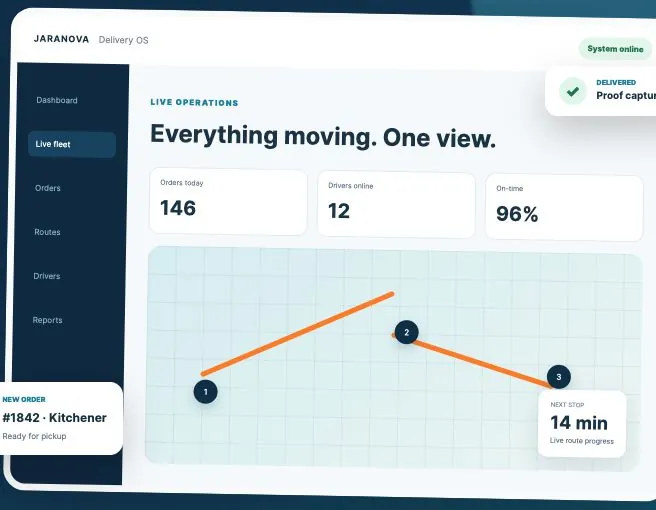
Explore the independently hosted platform. The public page presents order intake, store locations, driver assignment, route progress and delivery proof. A permitted demonstration must establish which workflows are ready for your operation.
Open Delivery OS ↗WooCommerce or manual order intake and store locations.
Publicly described · Operational verification pendingDriver assignment, route coordination and delivery states.
Publicly described · Operational verification pendingCustomer tracking; photos, signatures and timestamps are publicly described.
Publicly described · Operational verification pendingVerify role access, data handoff, exceptions, notification behaviour and proof capture.
Required rollout validationAccess, compatibility, provider terms and acceptance testing determine what can be connected. No new subscription is assumed.
Review goals, users, content, data and system access. Agree a dated milestone plan after discovery. Complexity, dependencies and review turnaround determine the schedule; no unverified fixed delivery time is promised.
Receive a proposal with deliverables, exclusions, responsibilities and acceptance criteria. Provider fees, licenses, media spend and ongoing support are separated where applicable.
Compare Launch, Grow, Scale & custom scope ↗Review on an isolated environment, test the agreed scenarios and approve the release separately. Handover, maintenance hours, response expectations and change requests are defined in the support agreement.
Questions specific to Logistics & Delivery.
Current automated behaviour is unverified. The permitted product demonstration must establish actual assignment and exception capabilities.
Role requirements are mapped first; implemented permissions must be tested in the current application.
Tracking is publicly described for Delivery OS; access control and production behaviour require verification.
Agree failure statuses, reassignment, customer communications and manual fallback before rollout.
Each source needs its own supported contract, identifiers and acceptance tests. Universal support is not assumed.
Use agreed service areas, synthetic or controlled test orders and clear acceptance criteria before a separately approved live rollout.
Merchants fund shipping labels and carrier charges through their own ClickShip/Freightcom accounts. Applicable Jaranova integration, maintenance and support services follow the agreed service package; Jaranova does not pay merchants’ shipping charges.
Trexity integration is planned, not activated or verified as live. Confirm provider coverage, service levels and the merchant connection before making a customer promise.
That is the intended retail direction. Jaranova POS is in development; order and inventory handoffs must be demonstrated and accepted before activation.
Tell us where you are today. We’ll help you plan what comes next.